In the details
A pointer that’s easy to follow
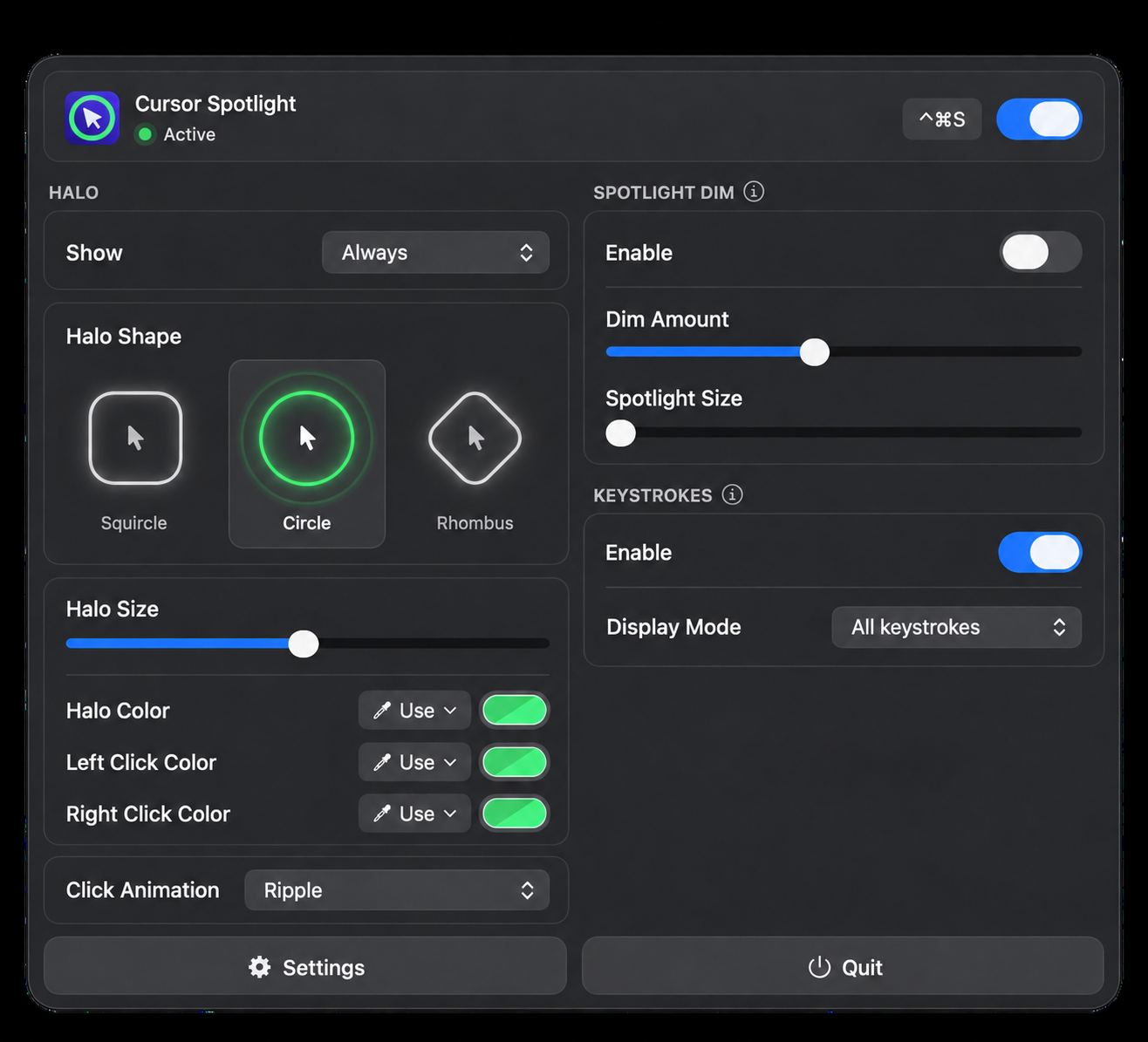
Choose a halo shape, then tune its size and color. A clear visual anchor helps you and your audience track your cursor.
 Cursor Highlighter
Help people follow every move. Cursor Highlighter makes your pointer easier to find during everyday work, presentations, lessons, and screen sharing. Add a halo, draw attention with a spotlight, and show the keys you press.

Free download on the Mac App Store · Requires macOS 12 or later
Choose a halo shape, then tune its size and color. A clear visual anchor helps you and your audience track your cursor.
Turn on keystroke display so viewers can follow the keys you press during a demonstration or lesson.
Download it free from the Mac App Store and open it from your menu bar.
Choose a shape, size and colors, and decide when the halo appears: always, on move, on click, or both.
Turn on the spotlight or keystroke display when you share your screen, and switch highlighting off from the menu bar when you’re done.
Made for everyday use.
Choose a circle, squircle, or rhombus, then adjust the size and color to suit your screen.
Keep the halo visible or have it appear with movement, clicks, or both.
Customize left- and right-click colors and add animations such as a ripple.
Dim the area around your pointer and adjust the spotlight size and dimming level.
Enable the on-screen key display to help viewers follow your actions and shortcuts.
Turn highlighting on or off and open your controls from the menu bar.
Still have a question? Email hello@macapp.studio.
It makes your pointer easy to see with a halo around the cursor, colored click highlights and animations, a spotlight that dims the area around the pointer, and an on-screen display of the keys you press.
Circle, squircle or rhombus, with adjustable size and color. The halo can be always visible or appear on move, on click, or both.
Yes. It’s made for presenting, teaching, screen sharing and recording, so your audience can follow every move and see your shortcuts.
Yes. Left-click and right-click highlights each have their own color, and you can add animations such as a ripple.
No. Keyboard events are processed only to show keystrokes on screen while that display is turned on, and they are not sent to the developer. Settings are stored locally on your Mac.
Cursor Highlighter requires macOS 12 or later.
Free download on the Mac App Store · Requires macOS 12 or later
Small apps for a better Mac day.
 Mouse ScrollSmooth, adjustable mouse-wheel scrolling with separate directions and per-app rules.
 Auto ClickerAutomate clicks, movement and scrolling, or record a macro and replay it with a keypress.
 Mouse JigglerGentle cursor movement to help you stay focused and engaged with your work.
 PomodoroFocused work sessions and well-timed breaks, right in your menu bar.